
Download Velocity, Paper, Floodgate, and backend tools
Velocity connects separate Minecraft servers behind one proxy, allowing players to move between a hub, survival server, and other backends. Separate server processes can distribute work, though capacity depends on the hardware and workload 1 2.
Download Velocity and Paper from PaperMC. Add Geyser and Floodgate if you want Bedrock crossplay, and choose gameplay plugins for the backends that need them 1 2 4.
Proxy scaling and crossplay network stack
 VelocityHigh-throughput PaperMC proxy linking lobby, survival, and Lifesteal backends.Download
 PaperMCModern forwarding targets configured in config/paper-global.yml.Docs
 FloodgateAllows Bedrock players to join without a Java account; backend installation is optional.Modrinth
 Grim AnticheatRemains installed inside each gameplay backend Paper server's plugins/.Modrinth
Place public ports strictly on Velocity and firewall every backend
Because Paper backend servers behind a proxy set online-mode=false inside their local server.properties files, leaving backend ports (such as 25566, 25567) reachable directly from the public internet lets attackers spoof arbitrary admin UUIDs straight onto your backends 1 3.
Bind Velocity cleanly onto public port 25565, bind backend Paper servers running on the same Linux box strictly to server-ip=127.0.0.1 (localhost), or block all external backend ports at your firewall (ufw/iptables) so traffic can enter strictly through the Velocity proxy 1.
Configure modern forwarding and forwarding.secret accurately
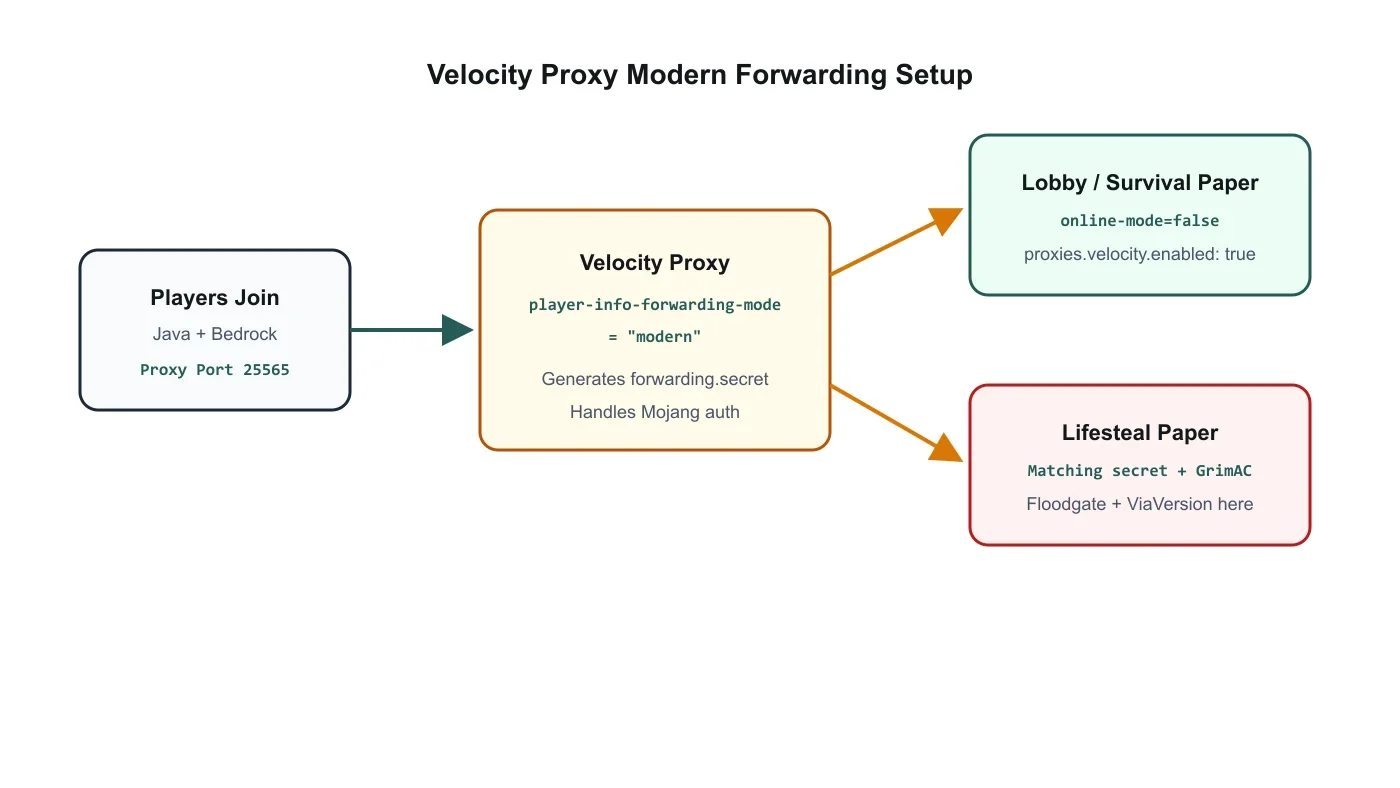
For modern Paper versions, start Velocity once, then set player-info-forwarding-mode = "modern" in velocity.toml. Add each backend address under [servers] and set the try list to the server players should join first 1.
On each Paper backend, set online-mode=false in server.properties and settings.bungeecord: false in spigot.yml. In config/paper-global.yml, set proxies.velocity.enabled: true, copy the contents of Velocity’s forwarding.secret into proxies.velocity.secret, and set proxies.velocity.online-mode to match online-mode in velocity.toml. Restart the backend. Keep the secret private and firewall every backend 1 3.
Paper 1.18.2 and older use settings.velocity-support in paper.yml instead. Check PaperMC’s forwarding documentation for version compatibility and exact settings 1.
# --- velocity.toml (on Proxy) ---
# player-info-forwarding-mode = "modern"
# forwarding-secret-file = "forwarding.secret"

# --- config/paper-global.yml (on each Paper backend) ---
proxies:
  velocity:
    enabled: true
    online-mode: true
    secret: "PASTE_EXACT_FORWARDING_SECRET_HERE"
Sync Geyser, Floodgate key.pem, and shared LuckPerms SQL
For Bedrock crossplay, install Geyser and Floodgate on Velocity, set Geyser’s auth-type to floodgate, and restart. Follow the current Geyser network instructions for the selected transport and ports 4.
Backend Floodgate is optional for its API and improved Bedrock skin support. If installed on backends, set send-floodgate-data: true in the proxy Floodgate configuration and copy the proxy’s key.pem into each backend Floodgate folder. Restart and keep the key private 4.
Install gameplay plugins on the appropriate Paper backends. Follow each plugin’s documentation for network storage and synchronization.
Where each plugin runs in a multi-server Velocity network
| Software / Plugin | Installed on Velocity proxy? | Installed on Paper backends? | Notes |
|---|---|---|---|
| Velocity JAR | Yes (proxy host) | No | Listens on public TCP 25565 1 |
| Geyser & Floodgate | Yes (Geyser-Velocity + Floodgate) | Optional: Floodgate for backend API | If installed on backends, share key.pem privately and enable send-floodgate-data 4 |
| LuckPerms & LibertyBans | Depends on plugin and topology | Depends on plugin and topology | Follow each project’s network setup and test sync |
| GrimAC & Gameplay Plugins | No | Yes (in backend plugins/) | Per-server combat & survival mechanics 5 |
Test seamless /server hops without duplicate inventories
Once hub, survival, and Lifesteal servers boot behind Velocity cleanly, log in via port 25565, verify /server switches between hub and survival cleanly without getting kicked for invalid modern forwarding secrets, and confirm Floodgate Bedrock logins pass UUID checks across worlds 1 4. Review our Java SMP setup guide and Paper plugin troubleshooting guide whenever modern forwarding rejects a new backend.
/server
/server survival
/server lifesteal
/velocity info
/velocity plugins
Production Velocity network verification checklist
Confirm directly from an external connection (outside localhost) that attempting to connect straight to any backend port fails at firewall level, whereas joining the Velocity proxy routes into your hub cleanly 1.
Velocity proxy deployment checks
- Keep backends isolated and open only the proxy and Geyser transport ports required by your setup.
- Set
player-info-forwarding-mode = "modern"insidevelocity.toml1. - Match each backend’s Velocity secret and
online-modesetting to the proxy; use the configuration path for your Paper version 1 3. - If backend Floodgate is installed, share the proxy key privately and enable
send-floodgate-dataon the proxy 4. - Verify
/serverrouting, sharedLuckPerms/LibertyBansdatabase sync, andGrimACalerts cleanly 5.
Frequently asked questions
Why does Paper kick players with 'If you wish to use IP forwarding, please enable it in your BungeeCord config'?
Check whether the backend has BungeeCord forwarding enabled by mistake, and confirm the proxy and Paper backend use matching modern forwarding settings. Connect through the proxy, and consult PaperMC’s forwarding troubleshooting guide.
Can I put Paper gameplay plugins like LifeStealZ or EssentialsX inside Velocity's plugins folder?
No. Velocity uses its own proxy API and only accepts Velocity-native plugins; gameplay plugins stay inside each backend Paper server's plugins/ directory.
How much RAM does a Velocity proxy need compared with Paper worlds?
Memory needs depend on player count, proxy plugins, and traffic. Monitor memory and performance under a representative load, then adjust the Java heap and available system memory.
Should online-mode stay true in velocity.toml even when backend Paper server.properties reads false?
Yes. Velocity authenticates Mojang Java logins cleanly when online-mode = true in velocity.toml and passes verified modern forwarding tokens onto online-mode=false firewalled backends.
Explore core INFIRALS Minecraft setup guides
Sources & evidence
- Velocity Getting started (PaperMC)
- Velocity downloads (PaperMC)
- Paper Global Configuration (PaperMC)
- Floodgate setup (GeyserMC)
- Grim Anticheat on Modrinth (Modrinth)