
Download Geyser-Spigot and Floodgate-Spigot
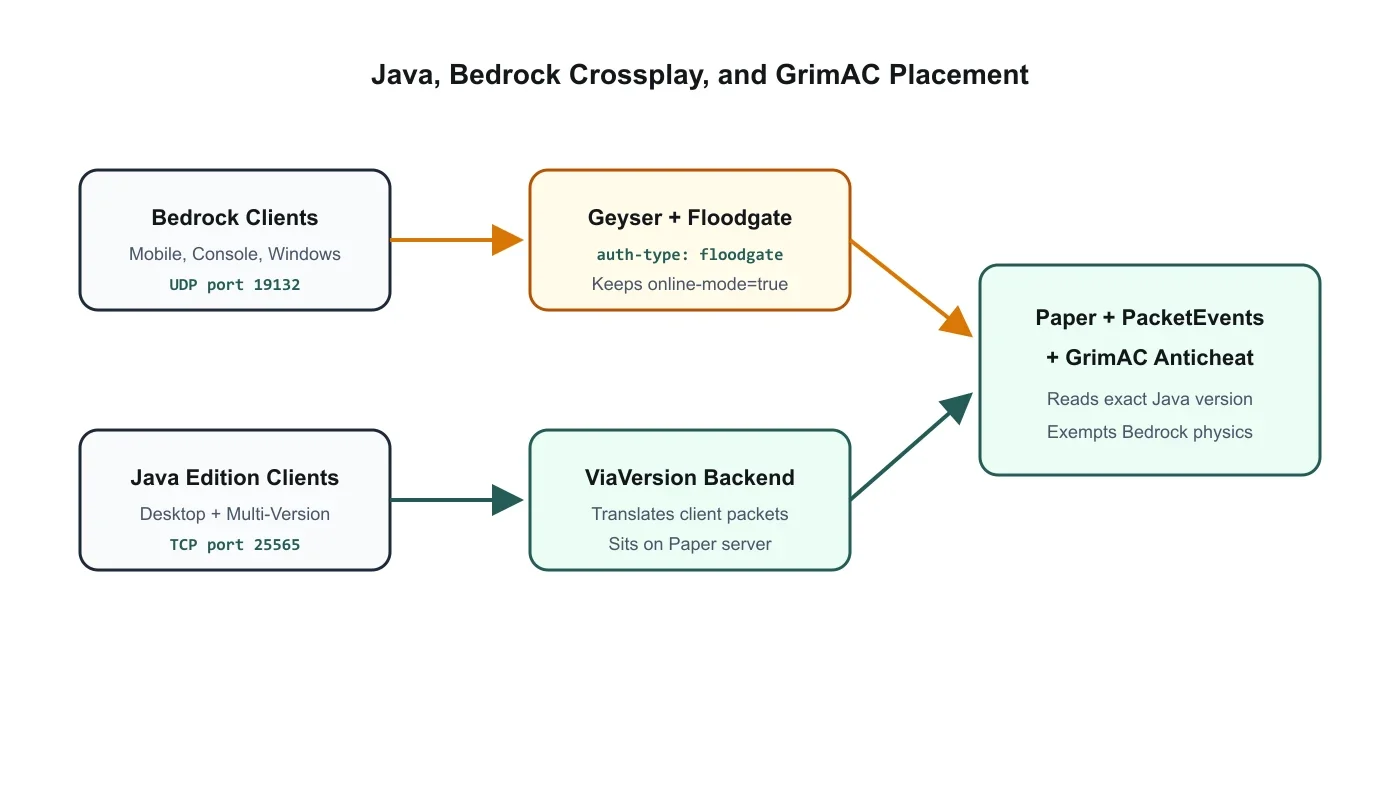
Friends on phones, tablets, PlayStation, Xbox, Nintendo Switch, and Windows Bedrock run a completely different protocol than Minecraft Java Edition. Pairing Geyser (protocol translator) with Floodgate (Xbox Live authentication bridge) lets Bedrock accounts play smoothly on your online-mode=true Paper survival or Lifesteal server without requiring them to buy a separate Java license 1 2 3 5.
Download Geyser-Spigot.jar and Floodgate-Spigot.jar directly from official GeyserMC or Modrinth pages 1 2 3.
Verified Bedrock crossplay downloads


Open the ports required by your Geyser transport
Check the current Geyser setup guide and the transport used by your installed version. For NetherNet, Geyser requires its port (typically 19132) on both TCP and UDP; forward both in the router and firewall, and ensure neither is already in use. Paper’s Java port is separate. On managed hosting, ask for a compatible allocated port 4.
sudo ufw allow 25565/tcp
sudo ufw allow 19132/tcp
sudo ufw allow 19132/udp
sudo ufw status
Configure auth-type floodgate and username prefixes
Stop the server, put the compatible Geyser-Spigot and Floodgate-Spigot jars in plugins/, then start once to generate their configs. In Geyser’s config set auth-type to floodgate, following the comments in the generated file, and restart. Keep Floodgate’s key.pem private 4 5.
bedrock:
  port: 19132
  transport: nethernet
Watch for whitelists, GriefPrevention names, and GrimAC exemptions
For an allowlisted server, use Floodgate’s /fwhitelist command and follow its current documentation for Bedrock names. Test access and permissions with a Bedrock account. If using anti-cheat or a proxy, follow their integration instructions and check for false positives; do not assume exemptions are configured automatically 5.
Manage Paper and Geyser updates when Bedrock patches drop
Mojang pushes Bedrock minor patches slightly out of sync with Java updates. Whenever Bedrock phones auto-update via app stores overnight and start seeing "Outdated Geyser server" disconnects, download only an updated Geyser-Spigot.jar build matching the latest Bedrock protocol without having to rebuild your entire Paper world 1 4.
Keep regular Floodgate releases matched whenever changing major Paper builds as well, and store a quick mobile join IP card inside Discord showing players both Java (25565) and Bedrock (19132) connection details. For Java client version gaps, we layer ViaVersion cleanly next. Check our Java SMP setup guide and Paper plugin troubleshooting guide if startup fails.
Test live crossplay joins from mobile or Windows Bedrock
Connect with a Java desktop account and a mobile Bedrock account simultaneously to verify dotted Floodgate prefixes appear in chat, chests open properly, and /tpa, /sethome, and claims work for both editions without syntax glitches 4 5.
Geyser and Floodgate verification steps
- Confirm both
Geyser-SpigotandFloodgate-Spigotload clean in/plugins1 5. - Open the TCP and UDP ports required by the configured Geyser transport.
- Set Geyser’s
auth-typetofloodgateand restart 5. - Verify
.-prefixed Bedrock accounts work withLuckPerms,EssentialsX, and claims 5. - Use
/fwhitelistwhen adding Bedrock-only players onto whitelisted servers 5.
Frequently asked questions
Can Bedrock friends join an online-mode=true Paper server without owning Java Edition?
Yes. Floodgate allows Bedrock players to join without a paid Java account when installed and configured correctly 5.
Why does Geyser ask Bedrock users to sign in with a Microsoft Java popup?
If remote.auth-type inside plugins/Geyser-Spigot/config.yml is left set to online instead of floodgate, Geyser forces full Java Edition Microsoft authentication.
What happens if a player joins using both Java and Bedrock with the same name?
Floodgate's default username prefix adds a period (such as .Steve) to the Bedrock session so inventories stay distinct unless you configure Global Linking later.
Does running Geyser hurt Paper server TPS significantly?
Overhead depends on player count, hardware, plugins and versions. Measure server performance with your own workload.
Continue crossplay and version setup
Sources & evidence
- GeyserMC Downloads (GeyserMC)
- Geyser on Modrinth (Modrinth)
- Floodgate on Modrinth (Modrinth)
- GeyserMC Wiki (GeyserMC)
- Floodgate Wiki (GeyserMC)